 Chrome
 Firefox
 Edge
Edge
What Is New in Download All Files 1.4.1
Version 1.4.1 of Download All Files is out, and this release is all about making real use smoother: clearer lists, tidier folders, and faster picking of the files you care about.
Larger, Easier to Read Popup
Many people said the popup felt cramped and cut filenames too early. In 1.4.1 the popup now stretches to the maximum allowed width in the browser. This means:
- Longer filenames are readable at a glance
- Less hovering to see full names
- More confidence that you are downloading the right files
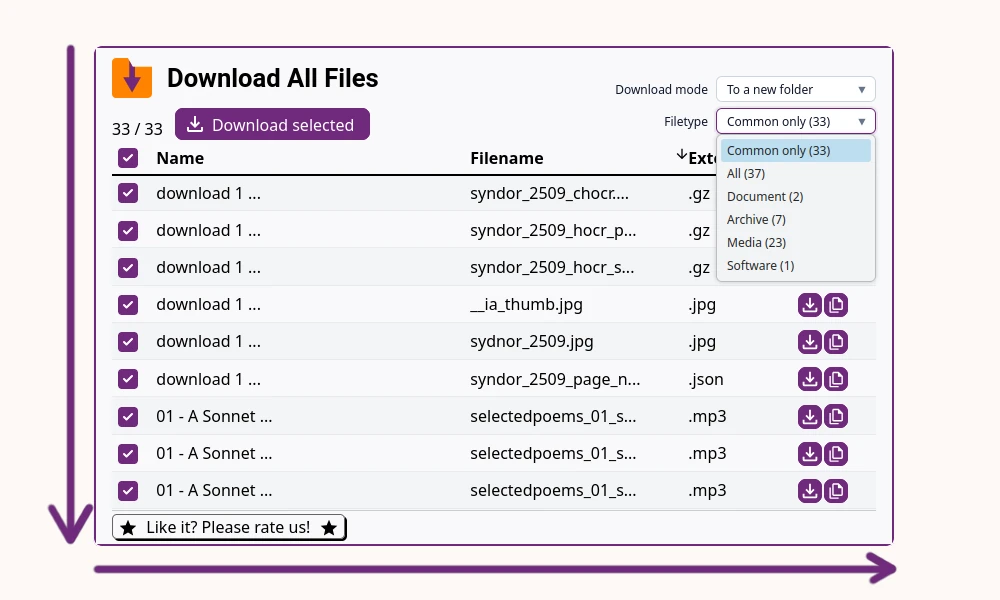
It is a small change that makes scanning through many files less tiring.
Download Modes for Downloaded Files
When you download a lot of files from different sites, your default download folder can quickly turn into a mess.
To make this easier to manage, there are now three download modes:
- Save everything into a new folder named after the website and the day
- Keep using the default behavior and save straight into your download folder
- Let the browser ask you where to save each file, one by one
This helps you keep files grouped by site or session, which makes it easier to find them later. A single ZIP archive mode is already in progress and planned for a future release.
Filter by Filetype Group
Before this update, filtering was basically manual: sort the list, scan, and pick. Now you can quickly narrow down results with the new Filetype Group select box.
You can, for example:
- Show only documents
- Show only media files
- Show only common extension, to avoid non-files
- And there are more filters
This makes it faster to focus on the file types you actually need. More advanced filtering options are planned for future versions.
Smaller Extension, Better Performance
Under the hood, the extension now uses your system font and has a cleaner codebase. This reduced the overall size of the extension and improved stability. It is a quiet change, but it matters, especially on low end devices.
That is the full set of changes in version 1.4.1. I hope these tweaks make your bulk downloads a bit calmer and more organized. If you have ideas or feedback on what would help you next, I would be happy to hear from you.