
 Chrome
 Firefox
 Edge
Edge
How I Download All Lecture Files Instantly
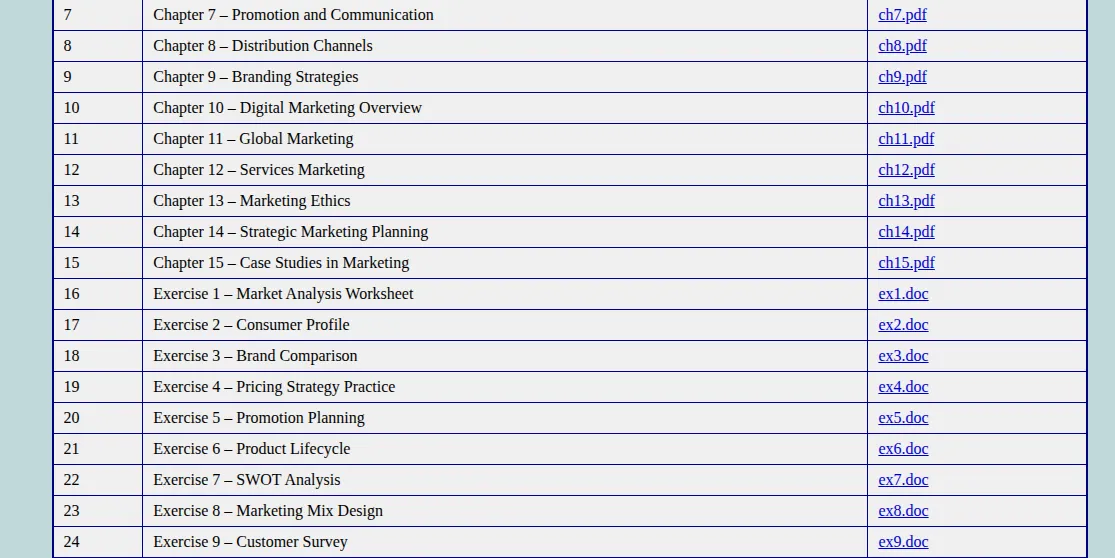
It was almost midnight, and I was still chasing files. The professor’s website looked like it hadn’t been updated since the early 2000s-each lecture had its own page, each page had its own download links, and every link opened in a new tab. I’d grab one PDF, close the tab, open another, and repeat. The notes, readings, and scanned exercises were scattered everywhere. By the time I had everything, my coffee had gone cold and my patience with it.
Being a student means juggling time, not wasting it. Between lectures, projects, and trying to have some sort of life, I needed an easier way to collect all those materials. I wasn’t trying to cut corners-I just wanted to stop spending an hour doing what should take a minute.
That’s when I discovered a simple but brilliant extension called [Download All Files](Download All Files). It works on Chrome and Firefox, and it does exactly what the name suggests: it finds every downloadable file on a web page and lets you grab them all at once. It’s safe, only runs when I open it, and doesn’t sneak around in the background. It quickly became one of those tools I didn’t know I needed until I used it.
Now my routine feels effortless. When I open a page-whether it’s the course site or a shared folder-I just click the extension. It instantly lists all the files it finds: PDFs, spreadsheets, images, text documents, and more. I can select the ones I need or grab them all together. Then, with one click, everything starts downloading.
No more guessing which file is hiding behind which button. No more digging through half-broken links or waiting for pop-ups to appear. Just a simple list, clear and ready.
It’s been a lifesaver for all the typical student situations:
- Lecture materials split across multiple pages-now I capture them in seconds.
- Group notes uploaded by classmates in random formats-one quick scan and I’ve got them all.
- Scanned readings that used to take forever to collect-done in one pass.
- Practice exercises and Excel templates from online resources-everything grouped and downloaded together.
One of my favorite uses is making study bundles. When a friend is preparing for exams, I’ll open the module’s pages, run the extension, and create a clean folder with all the readings, slides, and worksheets. It feels good to share something organized instead of sending ten separate links that no one opens.
The best part is how safe and controlled it feels. The extension only activates when I choose to open it, so it never runs in the background or touches unrelated pages. It’s not some risky “auto downloader”-it’s simply a smart assistant that gathers what’s already there and hands it to me neatly.
Since I started using it, I’ve reclaimed hours that used to vanish into endless clicking. I can focus on studying instead of file hunting. The time I used to waste collecting materials now goes into actually reading them-or taking a well-earned break.
If there’s one thing I’ve learned in college, it’s that being a good student isn’t just about studying hard. It’s also about finding small ways to save time and energy. For me, Download All Files turned a tedious, time-consuming task into a quick, satisfying click.
Because sometimes, being clever with your tools is what keeps you sane-and ahead.